

Key takeaways
- Compare the TCL D1 Pro palm vein smart lock with fingerprint and keypad deadbolts, and find which keyless entry lock fits your front door and household.
A front door lock looks simple until the day a family member arrives with arms full of groceries, a guest needs entry while you are away, or a lost key means calling a locksmith. The real decision behind the TCL D1 Pro Palm Vein Smart Lock is not whether a palm scan feels futuristic, but whether a touchless biometric lock with a rechargeable battery and built-in Wi-Fi can replace keys and codes without adding a new chore to every arrival. Buyers who get this right stop thinking about the door and simply walk in.

This guide is for homeowners replacing a standard deadbolt on a front door, renters and hosts who hand out temporary access, families with children and older relatives who forget keys and codes, and anyone who wants a keyless lock that still offers a physical key when electronics fail. Every lock below comes from its Amazon listing, with unlock methods, battery details, and compatibility figures taken from the product page.
Quick Picks
As an Amazon Associate we earn from qualifying purchases
| Product | Best for | Key spec from title |
|---|---|---|
| TCL D1 Pro Palm Vein Smart Lock | Touchless palm entry for busy households | Palm Vein Smart Lock, Keyless Entry Door Lock, Upgraded Rechargeable Battery |
| eufy Security Smart Lock C220 | Fast fingerprint entry with no hub | Fingerprint Keyless Entry Door Lock, Built-in Wi-Fi, 8Months Battery |
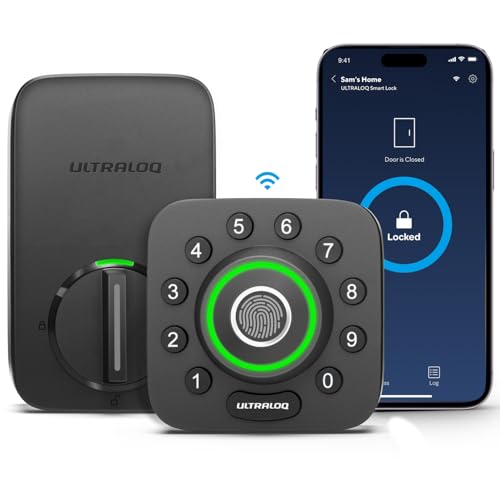
| ULTRALOQ U-Bolt Pro WiFi Smart Lock | Many entry methods and door status alerts | 8-in-1 Keyless Entry Door Lock with Fingerprint ID, Built-in WiFi Keypad Deadbolt |
How to Choose
Decide which biometric method suits your household
Palm vein scanning and fingerprint scanning both open a door without a key, yet they behave differently in daily use. Palm vein recognition reads vein patterns beneath the skin, so it can work when a palm is wet or dirty and when the hand approaches at an angle, which helps when hands are full. A fingerprint reader is faster to learn and more familiar, and most visitors already know how to press a finger to a sensor. Think about who will use the door every day, including children with small hands and older relatives with dry skin, and choose the sensor that the least confident user in the house can operate without help.
Count the backup ways in before you need them
A smart lock earns trust through its fallbacks, not through its headline feature. The TCL D1 Pro lists six unlocking ways, the eufy C220 lists six as well, and the ULTRALOQ U-Bolt Pro WiFi lists eight, yet the mix matters more than the total. Check that the lock offers a physical key for a dead battery, a keypad for guests who have no app, and a fob or a code for a visitor who arrives while your phone is charging. A household with frequent guests should favour a lock with temporary codes and remote sharing, while a single occupant can accept fewer methods if the key and the keypad both work reliably.
Check the battery and the charging routine
Battery design decides how often the lock demands attention. The TCL D1 Pro uses a 7800mAh rechargeable lithium polymer battery, so it needs a charging session rather than a fresh set of cells, while the eufy C220 lists an 8-month battery life on standard AA batteries and the ULTRALOQ U-Bolt Pro WiFi runs on replaceable cells with a long service interval. A rechargeable pack suits a household that keeps a spare charging cable near the door and remembers to top up, while disposable batteries suit a household that would rather swap cells once or twice a year. Before buying, confirm where the charging port sits and whether the lock warns you well before the battery runs flat.
Match the lock to your door and your smart home
A lock that does not fit the door or the household system is a poor purchase no matter how clever its sensor. Measure the backset, the bore, and the door thickness, and confirm the lock suits a standard left-handed or right-handed door if your door swings the other way. The TCL D1 Pro works with Amazon Alexa and Google Assistant over built-in Wi-Fi, the eufy C220 connects through built-in Wi-Fi with Alexa and Google Assistant, and the ULTRALOQ U-Bolt Pro WiFi adds SmartThings and IFTTT alongside Alexa and Google Home. None of these three locks lists Apple Home Key support, so an Apple-centred household should weigh that gap before buying.
The 3 Best Options
TCL D1 Pro Palm Vein Smart Lock
The TCL D1 Pro Palm Vein Smart Lock is the lock this guide centres on, and it earns that place by making entry hands-free. Its palm vein sensor opens the door with a wave of the hand, which suits a household arriving with shopping, luggage, or a child in tow, and its six unlocking ways mean a keypad code, a fob, a physical key, or the app can step in when a palm scan is not convenient. Built-in Wi-Fi brings remote control and auto-lock without a separate hub, while the rechargeable battery removes the routine of buying replacement cells.
Specs
- Lock type: Biometric, Deadbolt, Keypad, Palm Vein Smart Lock
- Special feature: 6 Unlocking Ways, Palm Vein Recognition Unlock, Eco-friendly Rechargeable Battery
- Battery: 7800mAh rechargeable lithium polymer battery, included
- Connectivity protocol: Wi-Fi
- Control method: App, Remote, Touch, Voice
- Controller type: Amazon Alexa, Google Assistant
- Material: Metal
- Colour: Black
- Item dimensions: 2.79 x 0.71 x 5.4 inches
- Item weight: 3.4 pounds
- Included components: exterior assembly, interior assembly, latch, 2 keys, 2 fobs, hole opening diagram, video guide card, operating manual, screw accessories
- Model name: TCL D1 Pro Palm Vein Recognition Smart Lock
- Item model number: D1 Pro
Best for: busy families and households that want touchless palm entry with key, fob, and code backups.
Watch out for: the palm sensor sits on the interior assembly in some installations, so check the mounting layout and the door handing before ordering, and confirm the Wi-Fi signal reaches the front door.
eufy Security Smart Lock C220
The eufy Security Smart Lock C220 is the pick for buyers who want fingerprint entry without a hub and without a learning curve. Its fingerprint reader unlocks with a touch in less than one second and learns with use, so regular household members get in quickly while the keypad, the app, a physical key, Apple Watch, and voice control through Alexa or Google Assistant cover guests and unusual days. Built-in Wi-Fi gives remote control from anywhere without a bridge, and installation is described as a 15-minute job without drilling on most standard deadbolts.
Specs
- Lock type: Deadbolt
- Special feature: 8-month battery life, self-learning AI fingerprint, 6-way unlocking, built-in Wi-Fi control
- Unlock methods: fingerprint, eufy Security app, keypad, physical key, Apple Watch, voice with Alexa or Google Assistant
- Fingerprint unlock: less than 1 second
- Battery life: 8 months
- Batteries: 8 AA batteries
- Connectivity: built-in Wi-Fi, no bridge required
- Water resistance: IP53 Waterproof
- Durability: BHMA Grade 3 Certified after being locked and unlocked more than 100,000 times
- Operating temperature: -22F to 158F
- Installation: 15-minute easy install without drilling, compatible with most standard deadbolts
- Material: Aluminum
- Colour: Black
- Model name: C220
- Item model number: T8506
Best for: households that want fast fingerprint entry, remote control, and a lock that installs quickly on a standard deadbolt.
Watch out for: fingerprint readers can struggle with very wet fingers or direct sunlight on the sensor, so keep the physical key and a keypad code ready as backups.
ULTRALOQ U-Bolt Pro WiFi Smart Lock
The ULTRALOQ U-Bolt Pro WiFi Smart Lock is the pick for buyers who want the widest choice of entry methods and the clearest picture of what is happening at the door. Its eight entry methods cover fingerprint, keypad, app remote control, auto unlock and auto lock, a web portal, eKey sharing, voice control with Alexa and Google Assistant, and two mechanical keys, so a household, a guest, or a cleaner can each use the method that suits them. A door sensor checks whether the door is open or closed and raises an alert when it stays open, while built-in Wi-Fi removes the need for an extra hub.
Specs
- Lock type: Biometric, Combination Lock, Deadbolt, Keypad
- Special feature: Built-in WiFi, 360-degree Fingerprint ID with AI, Door Left Open Alert, Door Sensor for Smart Auto Lock
- Unlock methods: AI-powered Fingerprint ID, Keypad, App Remote Control, Auto Unlock and Auto Lock, Web portal, eKey sharing, Voice control with Alexa and Google Assistant, 2 Mechanical Keys
- Connectivity: built-in WiFi, 2.4GHz WiFi only, no extra hub required
- Smart home integration: Amazon Alexa, Google Home, SmartThings, IFTTT, U Home app
- Security standard: ANSI Grade 1
- Water resistance: IP65 dust and weatherproof
- Material: Zinc
- Item dimensions: 2.95 x 2.95 x 1.19 inches
- Installation: fits most US standard left-handed or right-handed doors, replaces a current deadbolt with a screwdriver in 10 minutes
- Guarantee: lifetime mechanical and 18 months electronic guarantee
- Model name: U-BOLT-PRO-WiFi
- Item model number: U-BOLT-PRO-WIFI
Best for: hosts, larger households, and buyers who want door status alerts and many ways to share access.
Watch out for: the lock connects on 2.4GHz Wi-Fi only, so a router that separates its bands needs the lock joined to the 2.4GHz network, and the fingerprint sensor needs a clean, dry finger for the quickest read.
Which One Fits Your Situation
You arrive home with full hands most days
Choose the TCL D1 Pro Palm Vein Smart Lock. Its palm vein sensor opens the door without a finger press, a code, or a phone in hand, which is exactly what a parent carrying shopping or a traveller with luggage needs. The six unlocking ways still cover the days when a palm scan is awkward, and the rechargeable battery means no hunt for spare cells when the lock needs a charge.
You want the fastest familiar entry for the whole family
Choose the eufy Security Smart Lock C220. Its fingerprint reader unlocks in less than one second, the whole household already understands how to use it, and the keypad and app cover guests without extra hardware. Built-in Wi-Fi gives remote control without a bridge, and the 15-minute installation without drilling keeps the upgrade simple on a standard deadbolt.
You host guests, cleaners, or short stays
Choose the ULTRALOQ U-Bolt Pro WiFi Smart Lock. Its eKey sharing and temporary codes let you grant access for a set visit and remove it afterwards, while the door sensor and entry log show whether the door is closed and who came in. Eight entry methods mean a guest can use a code, a host can use a fingerprint, and a mechanical key remains for emergencies.
Your door faces harsh weather and heavy daily use
Choose the ULTRALOQ U-Bolt Pro WiFi Smart Lock. Its IP65 dust and weatherproof body and ANSI Grade 1 standard suit an exposed front door that sees rain, dust, and constant traffic, while the door sensor adds an alert when the door stays open. If palm entry matters more than weather sealing, the TCL D1 Pro remains the better fit for a sheltered doorway.
Common Mistakes
- Buying a biometric lock without measuring the backset, bore, and door thickness, then finding the new deadbolt does not fit the existing door.
- Choosing a lock for its headline sensor and ignoring the backups, leaving no key or code ready when a battery dies or a sensor misreads.
- Joining a 2.4GHz-only lock to a 5GHz network, or placing it where the Wi-Fi signal is too weak for remote control to work.
- Skipping the auto-lock setting and the door sensor alert, then leaving the door unlocked after a hurried exit.
- Giving every guest the same permanent code instead of a temporary code that can be changed or removed after a visit.
Frequently Asked Questions
Does palm vein unlocking work with wet or dirty hands?
Palm vein recognition reads vein patterns beneath the skin, so it can work when a hand is wet or dirty and when the palm approaches at an angle. That helps after gardening, in rain, or when carrying items. Keep a keypad code and a physical key ready as backups, because a sensor can misread if the hand sits far outside its range.
How long does the TCL D1 Pro battery last between charges?
The TCL D1 Pro uses a 7800mAh rechargeable battery, so its time between charges depends on how often the door opens, how far the lock sits from the router, and how often auto-lock runs. Households with heavy traffic should check the battery level in the app weekly until a routine forms. Charge the pack before it runs flat, and keep a physical key nearby while charging.
Can a smart lock work when the Wi-Fi goes down?
A smart lock can open with a palm scan, a fingerprint, a keypad code, a fob, or a physical key when the Wi-Fi goes down, because those methods work at the door itself. Remote control and entry logs need a connection, so they pause until the network returns. Choose a lock with several local methods if your network drops often, and keep a mechanical key safe.
Do I need a hub for these keyless deadbolts?
None of the three locks in this guide needs a separate hub for basic remote control, because each connects through built-in Wi-Fi. The TCL D1 Pro and eufy C220 work with Alexa and Google Assistant, while the ULTRALOQ U-Bolt Pro WiFi adds SmartThings and IFTTT. A hub only matters for deeper automation with a platform the lock does not support directly, such as a Zigbee network.
More from Amazon
Programs that pair well with the guide above. Offers and eligibility are set by Amazon and may change.
Free shipping on eligible items, Prime Video and more. Eligible new members can start with a free trial.
Start a Prime free trialAudiobooks and podcasts to listen to on the go. Eligible new members can start with a free trial.
Try Audible freeAd-free music streaming. Eligible new subscribers can start with a free trial.
Try Music Unlimited freeA free business account with business pricing and bulk-buying tools for work, shop or home office.
Create a business accountAs an Amazon Associate we earn from qualifying purchases.
Write Your Review
No reviews yet. Be the first to share your experience!