

SimpliSafe is the best home alarm system for most households in 2026 because it is easy to install, scales from an apartment to a large house and offers professional monitoring without a long contract. Ring Alarm Pro is the better fit for Alexa and Ring camera owners, abode suits people who want broad smart-home integration, and Wyze Home Monitoring is the low-cost starter. The real decision is about monitoring, backup connectivity and how many entry points you must cover.
Our top picks


As an Amazon Associate we earn from qualifying purchases at no extra cost to you.
Quick comparison of the best home alarm systems
| Pick | Best for | Install | Backup connectivity | Monitoring | Price tier |
|---|---|---|---|---|---|
| SimpliSafe | Best overall | DIY, peel-and-stick sensors | Cellular backup in the base station | Optional professional plans, month-to-month | Mid to upper-mid |
| Ring Alarm Pro | Best for Alexa and Ring cameras | DIY | Battery backup; cellular backup on paid plan | Optional professional plan | Mid-range |
| abode | Best smart-home integration | DIY | Cellular backup on supported plans | Optional professional or self-monitoring | Mid to upper-mid |
| Cove | Best for traditional monitoring feel | DIY kit | Cellular connection included in hub | Professional monitoring plan | Mid-range |
| Wyze Home Monitoring | Best budget | DIY | Limited; no cellular backup | Optional monitoring plan | Budget |
Equipment bundles, plan names and features change often. Specifications come from manufacturer product pages, so confirm what is included in the kit and what requires a subscription.
Best overall: SimpliSafe
SimpliSafe is designed for people who do not want to hire an installer. You place a base station, stick sensors to doors and windows, add a keypad and arm the system from an app. Cellular connectivity in the base station means the system can still alert you if your internet drops. Optional professional monitoring offers dispatch to emergency services, and the company’s Active Guard feature allows agents to speak to intruders through its cameras, according to the manufacturer.
The system works fully only with a plan for monitoring or camera video history, and the equipment is proprietary, so you cannot mix it with other brands. The trade-off is simplicity and reliability, which is why it ranks at or near the top in most roundups.
Best for Alexa and Ring cameras: Ring Alarm Pro
Ring Alarm Pro combines a security hub with a built-in Wi-Fi 6 router from eero, battery backup and optional cellular backup through a paid plan. It works closely with Ring cameras and doorbells and with Alexa, which means one app shows all your devices. Contact sensors, motion detectors, keypads and sirens are inexpensive and easy to add.
Many features, including cellular backup and professional monitoring, require a Ring Protect Pro plan, and the system leans on the Ring ecosystem. If you are already using Ring devices, it is a sensible choice.
Best smart-home integration: abode
abode supports Alexa, Google Home, Apple HomeKit and Zigbee and Z-Wave devices, so it can integrate with many smart-home accessories. You can self-monitor for free or add professional monitoring by the month, and the system supports cellular backup on certain plans. It appeals to hobbyists who like automations and who want to use existing smart devices.
The setup is slightly more involved than SimpliSafe, and the hardware cost can be higher. It is a strong option if you want flexibility rather than the simplest installation.
Best traditional monitoring feel: Cove
Cove sells DIY kits built around a hub with cellular connectivity and offers month-to-month professional monitoring. The sensors are simple to place and the app is straightforward. It is aimed at people who want a conventional alarm experience without a long contract.
The ecosystem is smaller than Ring or abode, so there are fewer add-on devices. For households that want a basic alarm with dispatch, it is a solid pick.
Best budget: Wyze Home Monitoring
Wyze offers an inexpensive entry kit with a hub, sensors and a keypad, and an affordable optional monitoring plan. It works well for apartments and small homes where a basic alert is enough, and it connects to Wyze cameras you may already own.
The main limitation is that it does not have cellular backup, so an internet outage can block alerts and monitoring. Treat it as a budget system and consider adding battery backup to your router.
How to choose a home alarm system
Self-monitored or professionally monitored?
Self-monitoring sends alerts to your phone and leaves you to call for help. Professional monitoring routes alarms to a call center that contacts you and, if needed, dispatches emergency services. Professional plans cost more each month, but they matter if you travel or may not respond quickly.
Backup power and connectivity
A good system should keep working when power or internet fails. Look for battery backup lasting at least 24 hours and a cellular connection for alerts. Without these, a burglar who cuts internet could silence a Wi-Fi-only system.
How many sensors do you need? A worked example
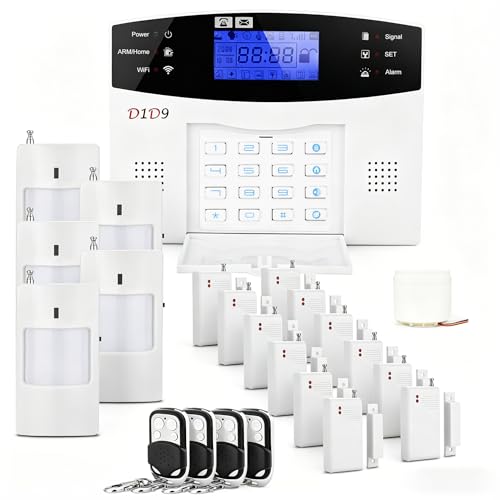
Count entry points: exterior doors, ground-floor windows, a garage door and any basement openings. For a house with 3 exterior doors, 8 ground-floor windows and a garage door, you need about 12 contact sensors. Add 1 or 2 motion sensors to cover main hallways and a glass-break sensor for large window groups. A starter kit with 5 or 6 sensors may not cover everything, so budget for extras.
Sensor types
- Contact sensors: detect doors and windows opening.
- Motion sensors: detect movement inside rooms; choose pet-friendly options if you have animals.
- Glass-break sensors: detect the sound frequency of breaking glass.
- Smoke, CO and water sensors: add protection beyond burglary.
Contracts and costs
Many DIY systems offer month-to-month plans with no long contract. Compare equipment cost with the cost of monitoring over three to five years, since the monthly fee often exceeds the hardware cost.
Cameras and doorbells
If you want video, look for a system that supports your preferred cameras. Mixing brands may mean separate apps and subscriptions.
Installation and ownership realities
- Test every sensor after installation. Open each door and window with the system armed in test mode.
- Replace batteries on schedule. Most sensors last years, but plan to check them annually.
- Warn household members and guests. Practice the arm and disarm steps to avoid false alarms.
- Check local alarm rules. Some areas require permits or fines for repeated false alarms.
- Use strong account security. Enable two-factor authentication on the alarm app.
What wears first is usually sensor batteries and adhesive on peel-and-stick mounts. Keeping spare batteries and a few extra sensors makes maintenance easy.
Which home alarm system should you buy?
| Your situation | Choose |
|---|---|
| Most homes, simple DIY setup | SimpliSafe |
| Alexa and Ring camera household | Ring Alarm Pro |
| Smart-home enthusiast | abode |
| Basic alarm with monitoring, no big ecosystem | Cove |
| Apartment or small home on a tight budget | Wyze Home Monitoring |
Frequently Asked Questions
Do I need professional monitoring for a home alarm?
No, but it helps if you travel or may miss notifications. Self-monitoring costs less, while professional monitoring dispatches help for you.
Will a home alarm work if the power goes out?
Most systems have battery backup for hours, and some last a day or more. Check the specifications, and add a cellular connection for alerts if the internet fails.
Can I install a home alarm system myself?
Yes. Most modern systems are designed for DIY with peel-and-stick sensors and app-guided setup. Plan an hour or two for a typical home.
What is the difference between a home alarm and security cameras?
An alarm detects entry and sounds a siren or alerts monitoring, while cameras record video. Many people use both, and some systems combine them.
Are home alarm systems worth it?
For many homes, yes, particularly if you want fast alerts and professional dispatch. Costs vary, so compare the hardware plus monitoring fees over several years.
Do alarm systems work with pets?
Yes, with pet-friendly motion sensors that ignore animals up to a given weight. Contact sensors on doors and windows are unaffected by pets.


Write Your Review
No reviews yet. Be the first to share your experience!