

Key takeaways
- Kwikset Halo Touch review: fingerprint entry, built-in Wi-Fi and SmartKey re-keying, compared with three other fingerprint smart locks worth a look.
Choosing a fingerprint smart lock comes down to how your household actually gets through the door. You are deciding whose prints get stored, which backup entry method you trust when a finger is wet or the batteries fade, and whether the lock talks to your router directly or needs a hub in between. The Kwikset Halo Touch puts the fingerprint reader and built-in Wi-Fi into a low-profile deadbolt with a physical key cylinder, which makes it the natural starting point for this review.
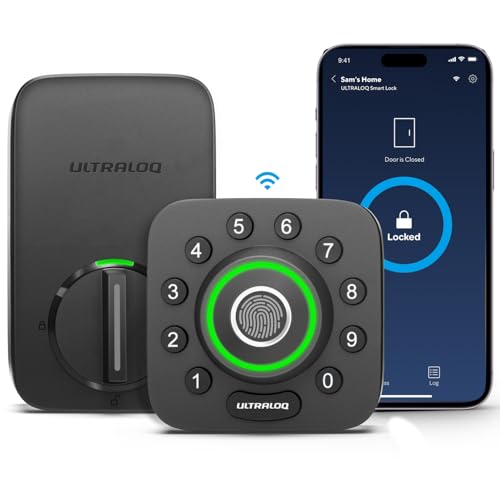

Below, the Halo Touch is covered first and in the most depth, followed by three same-type alternatives for different households: the ULTRALOQ U-Bolt Pro WiFi for hosts who share access often, the Yale Assure Lock 2 Touch for key-free, ecosystem-friendly entry, and the eufy Smart Lock C220 for a simpler built-in Wi-Fi setup with a long battery rating.
Quick Picks
As an Amazon Associate we earn from qualifying purchases.
| Product | Best for | Key spec from title |
|---|---|---|
| Kwikset Halo Touch | Fingerprint-first entry with a key backup | Built-in Wi-Fi, geofence auto-unlock |
| ULTRALOQ U-Bolt Pro WiFi | Hosts and shared homes | Door sensor included, 8-in-1 entry |
| Yale Assure Lock 2 Touch | Key-free entry and Apple households | Wi-Fi module and DoorSense in the box |
| eufy Smart Lock C220 | A simpler built-in Wi-Fi deadbolt | 8-month battery rating, IP53 rated |
How to Choose
Entry methods and fingerprint capacity
Start with how people will unlock the door day to day. Every lock here leads with a fingerprint reader, but the backup methods differ: the Halo Touch and the eufy C220 pair the reader with a keypad or a key, the ULTRALOQ adds codes, eKeys and a web portal, and the Yale goes key-free with codes and the app. Capacity matters in shared homes, too. The Halo Touch and the U-Bolt Pro WiFi each store up to 100 fingerprints, while smaller households may never approach those limits. Enroll two fingers per person where the lock allows it, so a bandaged or dirty fingertip does not lock anyone out.
Built-in Wi-Fi, modules and hubs
Remote access is the second decision. The Halo Touch, U-Bolt Pro WiFi and C220 carry built-in Wi-Fi, so they connect straight to a 2.4 GHz router with no hub to place or power. The Yale Assure Lock 2 Touch takes a different route: a Wi-Fi Smart Module sits inside the lock and can be swapped later, which adds flexibility but is one more part to keep track of. Built-in Wi-Fi also draws more power than Bluetooth-only designs, so check the battery rating and how the app reports charge. If your router sits far from the door, plan for a stronger signal before blaming the lock.
Key backup and re-keying
A fingerprint reader is an electronic device, and electronics run out of power. Three of these locks keep a physical keyway for that moment; the Halo Touch goes further with Kwikset SmartKey Security, which lets you re-key the cylinder yourself to match an existing Kwikset key or to retire a lost key without calling a locksmith. The Yale Assure Lock 2 Touch removes the keyway entirely for a cleaner face, which means a second point of entry and fresh batteries matter much more. Decide which failure mode you prefer before ordering, because you cannot add a keyway later.
Door fit, install and the rules that apply
Measure before you buy: door thickness, backset, and the diameter of the existing bore decide whether a swap is a ten-minute screwdriver job or a drilling project. All four locks here replace a standard deadbolt and include their mounting hardware, and each maker’s instructions should be followed exactly, including alignment of any door sensor so auto-lock behaves. Renters and condo owners should confirm landlord or association rules before replacing hardware, and anyone unsure about local code requirements for entry doors should check with a local locksmith or building official first.
The 4 Best Options
Kwikset Halo Touch
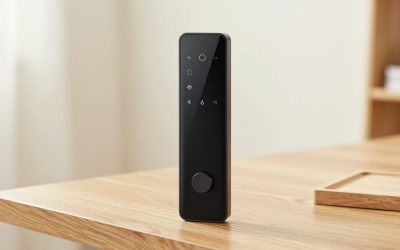
The Halo Touch is built around one idea: your finger is the credential, and everything else is a fallback. Its listing centers on fingerprint entry backed by the Kwikset app, voice control through Alexa or Google Assistant, and a physical key, with built-in Wi-Fi handling remote locking and alerts without a hub. Geofence auto-unlock can open the door as you arrive home, and the SmartKey cylinder lets you re-key the lock yourself. The ASIN reviewed here is the Matte Black finish, model 99590-004, in the low-profile contemporary square design.
Specs
- Entry methods: fingerprint, Kwikset app, voice via Alexa or Google Assistant, physical key
- Fingerprint capacity: up to 100 fingerprints
- Connectivity: built-in Wi-Fi, no hub required
- Auto-unlock: geofence-based, managed in the Kwikset app
- Cylinder: SmartKey Security re-key technology
- Certification: BHMA Grade AAA certified, as listed
- Finish: Matte Black, model 99590-004
- Power: 4 AA batteries
Best for: Households that want fingerprint-first entry with a re-keyable key backup.
Watch out for: No keypad on the unit, so guests need the app, a registered fingerprint, or a physical key.
ASIN: B08DYZF1CK
ULTRALOQ U-Bolt Pro WiFi
The U-Bolt Pro WiFi is the maximalist option in this group, stacking eight entry methods onto one deadbolt: fingerprint, anti-peep keypad codes, the app, auto unlock, eKey sharing, a web portal, voice control, and two mechanical keys. Built-in Wi-Fi means remote management works without a bridge, and the included door sensor tells the lock whether the door is actually closed before it throws the bolt, which makes auto-lock far more dependable. Its listing also carries an ANSI Grade 1 certification and an IP65 weather rating for the exterior unit.
Specs
- Entry methods: fingerprint, keypad code, app, auto unlock, eKey, web portal, voice, 2 mechanical keys
- Capacity: up to 100 fingerprints and 50 codes, as listed
- Connectivity: built-in Wi-Fi (2.4 GHz) and Bluetooth
- Door sensor: included, for position-aware auto-lock
- Certification: ANSI/BHMA Grade 1, as listed
- Weather rating: IP65 exterior
- Power: 4 AA batteries
Best for: Hosts, landlords and busy shared homes that hand out and revoke access often.
Watch out for: The feature list is long, and setup takes more time than the simpler locks here; the maker’s electronics warranty is shorter than its mechanical one.
ASIN: B0C61DKKL8
Yale Assure Lock 2 Touch
Yale’s Assure Lock 2 Touch takes the opposite approach to the Halo Touch: it removes the keyway altogether. The listing for model YRD450-F-WF1-BSP in Black Suede describes a key-free touchscreen deadbolt with a fingerprint scanner, entry codes, and the Yale Access app, with optional Auto-Unlock as you approach. A Wi-Fi Smart Module is included in the box rather than built into the lock body, and DoorSense is included to report whether the door is shut. It also works with Alexa, Google Assistant and Apple HomeKit, which none of the other three here can claim.
Specs
- Model: YRD450-F-WF1-BSP, Black Suede, key-free design
- Entry methods: fingerprint, touchscreen keypad codes, Yale Access app, optional Auto-Unlock
- Connectivity: Wi-Fi Smart Module included, plus Bluetooth
- Door sensor: DoorSense included
- Works with: Amazon Alexa, Google Assistant, Apple HomeKit
- Power: 4 AA batteries, included in the box
- Region note: listed as working in the U.S. and Canada on 2.4 GHz Wi-Fi
Best for: Apple households and anyone who wants a clean, key-free exterior with fingerprint and code entry.
Watch out for: With no keyway, a dead battery and no second entrance is a lockout; keep batteries fresh and another way in.
ASIN: B0CBN9Z74M
eufy Smart Lock C220
The C220 keeps the formula simple: a fingerprint deadbolt with built-in Wi-Fi, a keypad, and the eufy Security app, with no bridge to install. Its listing describes a self-learning AI fingerprint reader that unlocks in under a second, six entry methods in total including a physical key and Apple Watch, and a battery rating of around eight months from eight AA batteries. The exterior carries an IP53 rating. The trade-off sits in the certification line: the C220 is BHMA Grade 3, the basic residential grade, where the ULTRALOQ above lists Grade 1 and the Halo Touch lists Grade AAA.
Specs
- Model: T8506
- Entry methods: fingerprint, app, keypad, physical key, Apple Watch, voice via Alexa or Google Assistant
- Fingerprint: self-learning AI reader, unlock in under a second, as listed
- Connectivity: built-in Wi-Fi, no bridge required
- Power: 8 AA batteries, up to 8 months as listed
- Weather rating: IP53
- Certification: BHMA Grade 3, as listed
Best for: Buyers who want fingerprint entry and built-in Wi-Fi without extra modules or hubs.
Watch out for: Grade 3 is the entry-level BHMA grade, and there is no HomeKit or Matter support in the listing.
ASIN: B0C7C69FPS
Which One Fits Your Situation
You want fingerprint entry but refuse to give up a key
The Halo Touch is the balanced pick. Fingerprints handle daily arrivals, the app covers remote locking, and the SmartKey cylinder means a physical key still works and can be re-keyed in minutes after a move or a lost key. Choose it if your household mixes confident app users with people who simply want to press a finger and walk in.
You host guests or manage a shared front door
Pick the ULTRALOQ U-Bolt Pro WiFi. Codes, eKeys and the access log are built for rotating people, the door sensor keeps auto-lock honest, and built-in Wi-Fi means you can revoke access from anywhere. It is the most work to configure, but for a rental or a house with cleaners, sitters and older kids coming and going, that effort pays back quickly.
Your home runs on Apple and you hate visible keyholes
The Yale Assure Lock 2 Touch fits a HomeKit household and keeps the door face clean with its key-free touchscreen. Fingerprint and code entry cover the family, and the swappable Wi-Fi module leaves room to change radios later. Just be honest about the key-free trade-off: keep spare batteries in the house and make sure a second door or a jump-start plan exists.
You want the straightforward, set-and-forget deadbolt
The eufy C220 is the low-fuss route. Built-in Wi-Fi, six ways in, and an eight-month battery rating mean fewer parts and fewer battery swaps, and the fingerprint reader improves as it learns your prints. Accept the Grade 3 certification for what it is, a basic residential rating, and it suits a side door, a first smart lock, or a calmer household routine.
Common Mistakes
- Ordering before measuring door thickness, backset and bore size, then discovering the new deadbolt does not match the existing prep.
- Skipping or misaligning the door sensor on locks that include one, which leads to auto-lock firing while the door is still open.
- Expecting any of these locks to join a 5 GHz network; the listings describe 2.4 GHz Wi-Fi, so check your router bands first.
- Going key-free without a backup plan, instead of keeping fresh batteries, a second entrance, or the maker’s emergency power option in mind.
- Enrolling a single fingerprint per person, rather than two fingers each, so a cut, glove weather or a wet hand turns into a lockout.
Frequently Asked Questions
Does the Kwikset Halo Touch need a hub?
No. The Halo Touch has Wi-Fi built into the lock, so it connects directly to your 2.4 GHz home network and works with the Kwikset app, Alexa and Google Assistant without a separate hub or bridge. The same is true of the ULTRALOQ U-Bolt Pro WiFi and the eufy C220. The Yale Assure Lock 2 Touch instead uses an included Wi-Fi Smart Module that sits inside the lock.
How many fingerprints can these locks store?
The Halo Touch stores up to 100 fingerprints, and the ULTRALOQ U-Bolt Pro WiFi matches that figure at up to 100 prints alongside 50 codes. The eufy C220 stores up to 50 fingerprints per the maker’s documentation. For most families even the smaller capacity is plenty; what matters more is enrolling two fingers per person and re-enrolling a print if recognition gets unreliable over time.
What happens when the batteries run out?
The Halo Touch, ULTRALOQ and eufy C220 all keep a physical keyway, so a key still opens the door while you swap batteries, and each app warns you as charge runs low. The key-free Yale has no keyway, so its low-battery warnings and emergency power contacts matter more, and owners should keep a second way into the home. Replace batteries at the first warning rather than the last.
Can I install one of these locks myself?
Most owners can, because each of these models replaces a standard deadbolt using the existing door prep and basic hand tools, with the maker’s app guiding setup. Follow the manufacturer’s instructions exactly, test the bolt with the door open before trusting auto-lock, and check landlord, association or local code requirements first if the door is a shared or regulated entrance.
More from Amazon
Programs that pair well with the guide above. Offers and eligibility are set by Amazon and may change.
Free shipping on eligible items, Prime Video and more. Eligible new members can start with a free trial.
Start a Prime free trialAudiobooks and podcasts to listen to on the go. Eligible new members can start with a free trial.
Try Audible freeAd-free music streaming. Eligible new subscribers can start with a free trial.
Try Music Unlimited freeA free business account with business pricing and bulk-buying tools for work, shop or home office.
Create a business accountAs an Amazon Associate we earn from qualifying purchases.

Write Your Review
No reviews yet. Be the first to share your experience!