

Key takeaways
- Buying without checking door measurements.
- Skipping a backup key.
- Using weak, guessable codes.
- Ignoring battery warnings.
- Misaligned door frames that cause jamming.
The best smart lock is one that fits your door, works with the apps and assistants you already use, and still lets you in with a key or code when the power or Wi-Fi fails. For most homes, a keypad deadbolt with an app and a backup key offers the best balance of convenience and reliability, while retrofit locks suit renters and people who want to keep their existing deadbolt.
| Pick | Best for | Key feature |
|---|---|---|
| Yale Assure Lock 2 Touchscreen | Keypad lovers who want options | Touchscreen keypad with several connectivity modules |
| Schlage Encode Plus Smart WiFi Deadbolt | Built-in Wi-Fi and Apple Home Key | Direct Wi-Fi with a traditional deadbolt feel |
| August Wi-Fi Smart Lock | Retrofit on an existing deadbolt | Keeps your exterior hardware and key |
| Level Bolt Smart Lock | Hidden, minimal design | Discreet smart lock that fits inside the door |
| Eufy Security Smart Lock C220 | Value-minded keypad convenience | Keypad and app control with Wi-Fi |
| Ultraloq Bolt Fingerprint Smart Lock | Fingerprint entry | Fingerprint reader and keypad |
1. Yale Assure Lock 2 Touchscreen
Yale has made residential locks for generations, and the Assure Lock 2 modernizes that with a touchscreen keypad. You can choose between connectivity modules, such as Wi-Fi or Zigbee-based options, so it fits different smart home setups. It suits households that want codes for family, guests and service providers. The drawbacks are battery use when more connectivity is added and a design that will not suit every door style. Check the Yale Assure Lock 2.
2. Schlage Encode Plus Smart WiFi Deadbolt
Schlage is another long-trusted lock maker. The Encode Plus has built-in Wi-Fi, so you do not need a separate hub, and it supports Apple Home Key. It suits people who want a conventional keypad deadbolt that is easy to install and remote-capable. Some buyers note that Wi-Fi models use batteries faster than non-connected locks, so keep spare batteries. View the Schlage Encode Plus.
3. August Wi-Fi Smart Lock
August locks retrofit onto the inside of your existing deadbolt, so your exterior hardware and keys stay the same. That is a good solution for renters or anyone who likes their current lock. Because it turns the thumb turn mechanically, you need a deadbolt that operates smoothly, and the interior unit is visible on the door. There is no exterior keypad unless you add one. See the August Wi-Fi Smart Lock.
4. Level Bolt Smart Lock
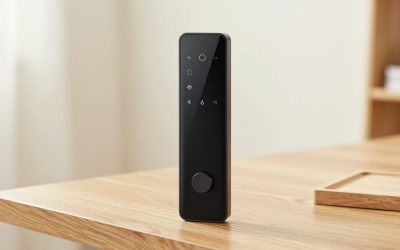
Level’s Bolt is designed to disappear: the mechanism sits inside the door so the exterior looks like a regular lock. It suits homeowners who want a clean look and still care about key and phone access. It is not the cheapest, and the installation requires attention to door prep. Features differ by model, so verify what is included, such as Apple Home Key support. Browse the Level Bolt.
5. Eufy Security Smart Lock C220
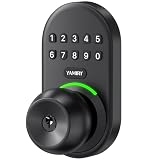
Eufy’s keypad lock offers app control and a Wi-Fi connection at a more accessible tier. It suits buyers who want to try smart entry without a big investment. Look carefully at the build quality of the keypad and the battery estimates, and confirm that the lock fits your door’s backset and thickness. Check the Eufy Smart Lock C220.
6. Ultraloq Bolt Fingerprint Smart Lock
Ultraloq offers fingerprint access as well as keypad and app control. It suits families who like the idea of unlocking with a touch, especially for kids who lose keys. Fingerprint readers can be less reliable with wet or dirty hands, and the enrollment process takes time. Have a code and a key as backups. View the Ultraloq Bolt.
How to Choose a Smart Lock
Door and hardware fit
Check your door thickness, backset and bore hole size. Most locks fit standard doors, but older or unusual doors may need adapters. Retrofit locks require a standard deadbolt with a thumb turn.
Connectivity
Built-in Wi-Fi is simple. Bluetooth works for nearby control. Zigbee, Z-Wave and Thread need a hub or compatible network. Pick the one that matches your smart home ecosystem.
Access methods
Keypad codes, app access, fingerprint and physical keys each have strengths. Keep a physical key or a backup option.
Power and batteries
Most smart locks use AA batteries. Look for low-battery alerts, and keep spares. Many locks also have a way to jump-start with a 9V battery if they die.
Security Considerations
A smart lock is only as secure as its weakest link. Use unique, strong codes, avoid obvious combinations like birthdays and change guest codes regularly. Turn on two-factor authentication for the app account, and keep firmware updated. Check how the lock handles lost connectivity, because a good design continues to work locally. Remember that door frame strength matters; a strong lock in a weak frame does not stop a kick. Reinforce the strike plate with longer screws.
Installation Tips
Most smart locks install with a screwdriver in under an hour. Remove the old deadbolt, check alignment, and make sure the bolt extends smoothly before attaching the new lock. Test with the door open before closing it. Set up the app, register codes and test the auto-lock function. If the bolt binds, adjust the strike plate before blaming the lock.
Smart Locks and Everyday Life
The real test of a smart lock is how it fits your daily routine. Families with children often like keypad codes, because kids do not need to carry keys and parents can see when they arrive home, if the lock supports activity logs. If you host guests or rent a room, temporary codes that expire on a schedule are valuable, since you never need to hand out physical keys. Dog walkers, cleaners and contractors can receive codes that work only at set times, and you can delete them when the job is finished.
Auto-lock is a feature that sounds convenient and sometimes causes surprises. If the door locks automatically a short time after closing, it prevents you from leaving the house unlocked, but it can lock you out if you step outside to get the mail. Choose a delay you are comfortable with, and keep a code or key handy. Many locks also include an auto-unlock feature that uses your phone’s location, which is handy but depends on your phone’s settings and battery.
Think about integration with other devices. Some locks connect to voice assistants, smart displays and home automation routines, so you can lock the doors with a bedtime command. Check what your ecosystem supports before you buy, because compatibility varies by model and by hub. Also consider whether you need remote access at all. A Bluetooth-only lock is simpler and often uses less battery, and many people find it perfectly adequate for everyday use.
Common Mistakes
- Buying without checking door measurements.
- Skipping a backup key.
- Using weak, guessable codes.
- Ignoring battery warnings.
- Misaligned door frames that cause jamming.
Frequently Asked Questions
Will a smart lock work if Wi-Fi goes down?
Most still work with keypad or key. Remote functions will not.
Can I use a smart lock in a rental?
Retrofit locks are a good fit, but check your lease and ask your landlord.
Are smart locks safe from hackers?
No device is perfectly secure, but reputable brands use encryption. Use strong passwords and update.
Do smart locks affect insurance?
Policies vary. Ask your insurer if there are requirements or discounts.
Conclusion
Yale and Schlage are strong all-around choices, August suits retrofits, Level looks the cleanest, Eufy is a value pick and Ultraloq adds fingerprints. Check fit and keep a backup key.
As an Amazon Associate we earn from qualifying purchases.
More from Amazon
Programs that pair well with the guide above. Offers and eligibility are set by Amazon and may change.
Free shipping on eligible items, Prime Video and more. Eligible new members can start with a free trial.
Start a Prime free trialAudiobooks and podcasts to listen to on the go. Eligible new members can start with a free trial.
Try Audible freeAd-free music streaming. Eligible new subscribers can start with a free trial.
Try Music Unlimited freeA free business account with business pricing and bulk-buying tools for work, shop or home office.
Create a business accountAs an Amazon Associate we earn from qualifying purchases.


Write Your Review
No reviews yet. Be the first to share your experience!