

Key takeaways
- The best outdoor security cameras with floodlights compared: eufy, Ring, Blink and Olafus by video quality, lighting, storage and installation.
The eufy Security Floodlight Camera E340 is the best overall pick for most homes because it pairs two lenses, a pan-and-tilt body and 2,000 lumens of floodlighting with local storage that avoids a required monthly plan. An outdoor security camera with floodlights is a hardwired camera that doubles as a motion-activated light fixture, so it records the visitor and lights them up at the same time. Buyers who already use Ring or Blink apps will find the Ring Floodlight Cam Wired Plus and the Blink Wired Floodlight Camera easy to fit into their setups, while the eufy E30 and Olafus offer 2K video at a gentler step.
Quick List
- eufy Floodlight Camera E340 – best for dual-lens coverage with zoom and tracking
- eufy Floodlight Camera E30 – best for 2K pan-and-tilt coverage with local recording
- Ring Floodlight Cam Wired Plus (White) – best for homes already using the Ring app
- Ring Floodlight Cam Wired Plus (Black) – best for the same camera in a darker finish
- Blink Wired Floodlight Camera – best for the brightest lights in a simple Alexa-friendly package
- Olafus 2K Floodlight Camera – best for custom detection zones and color night vision
Which One Is Right for You?
| If you… | Choose |
|---|---|
| want to zoom in on faces and plates across a wide yard | eufy Floodlight Camera E340 |
| need a 2K camera that follows motion with a lower-cost lens setup | eufy Floodlight Camera E30 |
| already own Ring devices and want matching apps | Ring Floodlight Cam Wired Plus (either finish) |
| prefer a black fixture on dark siding | Ring Floodlight Cam Wired Plus (Black) |
| live in an Alexa home and want strong lighting output | Blink Wired Floodlight Camera |
| need to ignore the street and focus on your walkway | Olafus 2K Floodlight Camera |
Three questions narrow this list quickly. First, do you want video stored locally or are you comfortable with a cloud plan? Second, which smart home ecosystem do you already use? Third, do you need a fixed camera or one that pans, tilts and tracks? All six cameras here are meant to be hardwired, so a qualified installer or a careful DIY approach is part of the decision.
All 6 Picks in Detail
1. Ring Floodlight Cam Wired Plus (White) – Best for Homes Already Using Ring
As an Amazon Associate we earn from qualifying purchases at no extra cost to you.

Ring’s wired floodlight camera is a familiar choice for people who already have a Ring doorbell or alarm. The listing describes motion-activated 1080p HD video and floodlights, and Ring’s pages describe two floodlights at 2,000 lumens, color night vision, two-way talk, a siren and customizable motion zones. Live view and notifications work without a plan, but saving, sharing and reviewing video requires a Ring Protect plan, which is worth weighing if you want a fully subscription-free setup.
- Video: 1080p HD as stated in the listing
- Lighting: two floodlights, about 2,000 lumens per Ring
- Audio: two-way talk and a siren
- Connectivity: 2.4 GHz Wi-Fi per Ring
- Power: hardwired
Pros
- Integrates with other Ring devices and the Ring app
- Customizable motion zones reduce false alerts
Cons
- Saved video needs a paid plan
- Resolution is lower than the 2K eufy and Olafus models
It is the best fit if you already live in the Ring ecosystem, whereas the eufy cameras favor local storage. Ring recommends professional installation for this wired model, and it may need a weatherproof electrical box, so factor in the work on the wall as well as the camera itself.
2. Blink Wired Floodlight Camera – Best for Bright Lighting in a Simple Setup

Blink’s wired floodlight camera leans on brightness and ease of use. The listing names 2,600 lumens, HD live view, enhanced motion detection, a built-in siren and Alexa support. Blink’s support pages describe two adjustable lights and a Wi-Fi connection without needing a separate hub, with local clip storage available through an optional sync module and a USB drive. A subscription plan adds cloud features, so review your storage preference before buying.
- Lighting: 2,600 lumens as stated in the listing
- Video: HD per the listing; Blink lists 1080p
- Audio: two-way audio and a siren
- Assistant support: Alexa
- Storage: cloud with an optional plan, or local through an add-on module
Pros
- Highest stated lighting output of the group
- Straightforward app for people who want little fuss
Cons
- Resolution is HD rather than 2K
- Local storage requires extra hardware
It lights a larger area than the Ring but does not offer the pan, tilt or zoom of the eufy models. Blink describes this camera as hardwired with no battery backup, so the camera and lights go dark in a power outage, which is a point to weigh if your area has frequent interruptions.
3. eufy Security Floodlight Camera E30 – Best for 2K Pan-and-Tilt Coverage
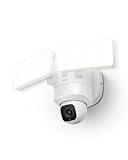
The E30 is the simpler of the two eufy models. The listing highlights 2K video, AI detection and tracking, 360-degree coverage, a pan-and-tilt body, 2,000 lumens, a built-in siren and 24/7 recording. A single lens means less versatility than the E340, but a pan-and-tilt camera that follows movement still covers more ground than a fixed unit.
- Resolution: 2K per the listing
- Movement: pan and tilt with AI tracking
- Lighting: up to 2,000 lumens
- Siren: built in
- Storage: local recording options are described by eufy; confirm card support on the listing
Pros
- Follows motion rather than staring at one angle
- No monthly fee is advertised for the basic local experience
Cons
- No telephoto lens for distant detail
- Hardwired installation is required
It trims the zoom lens found on the E340 and keeps the pan, tilt and lighting that matter most. For a typical front yard, that is enough, and the lower complexity can make setup easier for first-time buyers.
4. Ring Floodlight Cam Wired Plus (Black) – Best for the Same Camera in a Darker Finish

This listing is the black version of the same Ring Floodlight Cam Wired Plus described above, with matching name details: wired power, motion-activated 1080p HD video and floodlights. The practical difference is cosmetic, since a black fixture tends to disappear against dark trim, brick or siding, while white blends with light-colored eaves. Choose by the color of your house and confirm that both listings ship with the same mounting hardware.
- Video: 1080p HD per the listing
- Finish: black
- Lighting: motion-activated floodlights per the listing
- Features: color night vision, two-way talk and a siren according to Ring’s product pages
- Power: hardwired
Pros
- Same feature set as the white model with a less noticeable finish on dark houses
- Familiar app and notifications
Cons
- Identical subscription constraints for saved video
- Duplicates the white model, so there is no spec advantage
Choose it over the white version only if the finish matters; otherwise the two are equivalent. Read both listings side by side before ordering so that you receive the color you want, and be aware that the item names are otherwise the same, which is why we treat this entry as a color alternative instead of a different product.
5. Olafus 2K Floodlight Camera – Best for Custom Detection Zones
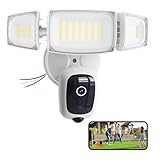
The Olafus listing describes a 2K QHD camera with motion-activated flood lights, custom detection zones, color night vision and two-way audio. It is a lesser-known brand compared with Ring, Blink and eufy, so read the product page carefully for details on storage, app support, power requirements and warranty. Custom zones are useful for facing a street, since you can exclude cars on the road and focus on the walkway.
- Resolution: 2K QHD per the listing
- Detection: custom detection zones
- Night vision: color, according to the listing
- Audio: two-way
- Storage and subscription terms: confirm on the listing
Pros
- 2K video at a competitive spec level
- Zones reduce alerts triggered by traffic
Cons
- Fewer ecosystem integrations than major brands, so confirm the app features
- Details such as storage method are not visible in the shortened listing name
It offers a similar resolution to the E30, but without the pan-and-tilt movement. Because the shortened listing name hides storage and plan information, spend a minute on the full product page to confirm how clips are saved and whether any features sit behind a paid tier before you decide.
6. eufy Security Floodlight Camera E340 – Best for Dual-Lens Coverage and Zoom

The E340 combines a wide-angle lens with a telephoto lens so it can show the whole driveway and zoom in on a detail at the same time. The listing mentions 360-degree coverage through pan and tilt, 8X zoom, AI detection and tracking, 2,000 lumens of floodlighting and 24/7 recording. eufy’s specification pages describe a 3K wide lens, a 2K telephoto lens, Wi-Fi 6 and a microSD slot, with expansion to a separate home base for larger storage.
- Lenses: dual lens, with a telephoto camera for close-ups
- Zoom: up to 8X as stated in the listing, part of it digital
- Lighting: two panels, up to 2,000 lumens
- Storage: microSD card slot for local recording per eufy; the card is sold separately
- Power: hardwired AC
Pros
- Zoom helps when details at a distance matter
- AI tracking follows people, vehicles and pets
Cons
- Requires wiring into a house circuit
- Some features, such as tracking, can reduce the top resolution
Compared with the E30, you get the extra telephoto lens and wider coverage, but the E30 does the basics for a simpler body. If you plan to mount it high over a wide driveway, the zoom lens is the feature most likely to justify the step up, since distant faces and vehicles remain recognizable when a single wide lens would show only small shapes.
Specs Compared
| Product | Video (per listing) | Lighting | Movement / coverage | Power | Storage / plan |
|---|---|---|---|---|---|
| eufy Floodlight Camera E340 | Dual lens; 3K wide and 2K telephoto per eufy | 2,000 lumens | 360-degree pan and tilt, 8X zoom | Hardwired AC | Local microSD per eufy; confirm on listing |
| eufy Floodlight Camera E30 | 2K | 2,000 lumens | 360-degree pan and tilt, AI tracking | Hardwired AC | Local recording; confirm on listing |
| Ring Floodlight Cam Wired Plus (White) | 1080p HD | Floodlights; about 2,000 lumens per Ring | Fixed, customizable motion zones | Hardwired | Protect plan needed to save video |
| Ring Floodlight Cam Wired Plus (Black) | 1080p HD | Floodlights; about 2,000 lumens per Ring | Fixed, customizable motion zones | Hardwired | Protect plan needed to save video |
| Blink Wired Floodlight Camera | HD | 2,600 lumens | Fixed; enhanced motion detection | Hardwired | Optional plan; local via add-on module |
| Olafus 2K Floodlight Camera | 2K QHD | Motion-activated floodlights; output confirm on listing | Fixed; custom detection zones | Confirm on listing | Confirm on listing |
How We Chose These
We compared the listed products using their titles, manufacturer pages and retailer specification fields, concentrating on video resolution, floodlight output, field of view or movement, power method and how recordings are stored. Cameras with clear local storage options or detailed specs ranked higher than listings that leave key details unstated. We also considered ecosystem fit, because a camera that works with apps and assistants you already use is easier to live with. Where a value is not stated, we mark it for confirmation. This guide is built from published information, not from lab measurements or ownership.
What to Look For
Resolution, Field of View and Night Vision
Resolution describes how much detail the sensor captures. 1080p is adequate for seeing who is at the door, while 2K and above give more room to digitally zoom into a face or vehicle. Field of view shows how wide the picture is, with figures around 130 to 150 degrees covering most driveways, and pan-and-tilt models extending that further by moving. Floodlight cameras usually offer color night vision by using the built-in lights, but the camera also needs an infrared mode when the lights are off. Check whether the camera records in color when the floodlights are triggered, and whether the lights can be set to stay dim.
Floodlight Brightness and Aiming
A pair of 2,000-lumen lights is bright enough to wash out a driveway, and 2,600 lumens will go a little further. More brightness is not always better, because glare can wash out the camera image if the lights are too close to the lens or reflect off a pale wall. Adjust the heads so that they point downward and away from neighbors, and consider schedules or sensitivity settings so the lights do not trigger at every passing car. Install at a height of about 8 to 10 feet to deter tampering while keeping faces within view.
Storage, Subscriptions and Privacy
Storage is where these cameras differ most. Some store clips on a microSD card or a home base, others rely on a cloud plan for saved video, and some offer both. A camera with local storage lets you keep recordings without a recurring bill, though the card can fill up and the footage can be lost if the camera is stolen or damaged. Cloud plans keep clips off-site and often add features such as person alerts. Whichever route you choose, use a strong, unique password and two-step verification, and confirm that video is encrypted in transit.
Wiring, Safety and Installation Rule of Thumb
These cameras run on household power, typically 100 to 240 volts AC, so installation involves the same care as hanging any outdoor light fixture. Turn off the circuit at the breaker, confirm that the wires are dead with a non-contact voltage detector, and use a weatherproof junction box rated for the fixture. If you are not comfortable working with mains wiring, hire a licensed electrician; it is a short job for a professional. As a rule of thumb, place the camera where it can see the entry point and the approach, keep it out of easy reach, and verify the Wi-Fi signal at the mounting spot with a phone before drilling. A weak signal will cause missed clips no matter how good the camera is.
AI Detection, Alerts and Smart Home Fit
Most current floodlight cameras claim some level of artificial intelligence detection, which usually means classifying motion as a person, vehicle, animal or package instead of simply reporting movement. The quality of that sorting differs from brand to brand, so look for settings that let you choose which categories send a phone notification. Tracking features, as on the pan-and-tilt eufy models, can follow a subject across the yard, though they work best when the person stays within a reasonable distance. Check which voice assistants the camera supports, because live view on a smart display is handy when someone knocks. Alexa is named on the Blink listing, and eufy lists both Alexa and Google Assistant on its product pages; confirm your assistant before you buy.
Fixed Versus Pan-and-Tilt Cameras
A fixed camera watches one angle, which is simple and reliable but can leave blind spots on wide properties. A pan-and-tilt camera covers a larger area and can follow a person across the frame, which is useful on corner lots, large driveways and backyards. The trade-off is that a moving camera may be looking the wrong way when something unexpected happens, and its moving parts add one more thing that can wear. If your main goal is watching one door or one gate, a fixed model with well-drawn motion zones is often enough; if you are covering an open yard, movement and zoom earn their place.
A Worked Example for Choosing
Imagine a corner house with a driveway on the left, a front walk in the middle and a side gate on the right, with the best mounting spot above the garage 9 feet off the ground. A fixed 140-degree camera would catch the driveway and the walk but miss the gate. A pan-and-tilt model with tracking can cover all three and zoom toward whoever walks in, so the dual-lens eufy suits that layout best. If instead you only need to watch a narrow side passage beside a shed, a fixed 1080p or 2K floodlight camera with a motion zone is plenty, and compatibility with your existing app becomes the deciding factor.
Questions
Do floodlight cameras need a subscription?
It depends on the brand. Ring requires a plan to save and review video, Blink offers cloud features through a plan with local options through an add-on, and eufy emphasizes local storage without a required monthly fee. Always confirm storage details on the product page.
Can I install a floodlight camera myself?
Many people replace an existing floodlight themselves, but it still involves mains wiring. Shut off the breaker, verify the wires are dead and use a weatherproof box. If there is no existing fixture or you are uncertain, hire a licensed electrician.
Will the floodlights come on all night?
Typically they trigger on motion and shut off after a set time, though many models also offer a steady-light mode. Check the app settings for schedules and brightness adjustments. Keeping them motion-activated helps limit light pollution.
Is 1080p video good enough?
For most front-yard views, yes, since 1080p shows clear detail at moderate distances. If you want to read license plates or identify faces farther away, 2K or a zoom lens helps. Wide scenes spread pixels thinly, so resolution matters more as the covered area grows.
Why do I get so many motion alerts?
Cars, trees, shadows and insects often trigger alerts. Use motion zones, lower the sensitivity and enable person or vehicle detection if offered. Moving the camera to a better angle can also reduce false triggers.
Does Wi-Fi band matter?
Yes. Some of these cameras connect only on 2.4 GHz, which travels farther but is more crowded, while others support dual band. Check the signal strength at the mounting location, and consider a mesh extender if the router is far away.
Update History
- October 20, 2026 – Initial publication; product set drawn from current catalog listings.
- Check the product page for current specifications and availability before buying.
Sources
- Manufacturer product and specification pages for eufy, Ring and Blink
- Retailer listing titles and specification fields for all six products
- Manufacturer support pages describing storage and plan options




Write Your Review
No reviews yet. Be the first to share your experience!