

Key takeaways
- Mount cameras high enough to be out of easy reach, usually around the height of a first-floor soffit, and angle them down.
- Cover the front door, back door, garage and any ground-floor window that faces a hidden side of the house.
- Avoid pointing cameras at neighbors’ windows or yards. Local laws on video and audio recording differ, so read your area’s rules.
- Do not place cameras in bathrooms or bedrooms of guests or tenants without consent.
- Use a strong, unique password and turn on two-factor sign-in. Keep firmware current.
- Outdoor cameras need a weather rating stated by the maker; mount them under eaves when possible.
A wired PoE camera system with a network video recorder, such as Reolink or Eufy kits, suits homeowners who can run cable and want continuous recording with no monthly fee, while wire-free systems such as Arlo Pro, Eufy battery cameras or Wyze cameras suit renters and anyone who cannot drill. Reviewers agree on this basic split, and most of the buying decision comes down to cabling, storage and how much you are willing to pay in subscriptions over time.
A “DIY camera system” means several cameras you mount yourself, managed through one app and recorded either to local storage or to the cloud. This guide leans on maker descriptions and outlets including SafeWise, Consumer Reports and TechGearLab as summarized in 2026 search results. Any number below is the maker’s or reviewer’s statement, not a measurement taken here.
Our top picks

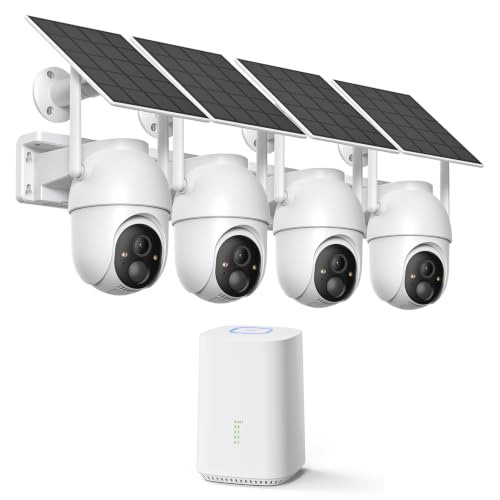


As an Amazon Associate we earn from qualifying purchases at no extra cost to you.
At a Glance: DIY Camera Systems Compared
| System | Type | Best for | Reported strengths | Reported limits |
|---|---|---|---|---|
| Reolink PoE NVR kits (for example the 12MP PoE NVR system) | Wired, local recording | Homeowners who can run Ethernet cable | Continuous recording to a local hard drive, no ongoing subscription; one review site scored it 8.9 out of 10 | Reviewer notes low-light performance is more limited; cable runs take effort |
| Eufy 4K PoE NVR system | Wired, local recording | Buyers who want a friendlier app with local storage | App described as more consumer-friendly than traditional NVR software; scored 8.5 by the same site | Needs cabling; fewer camera styles than some rivals |
| Reolink Argus PT Ultra | Wire-free, pan and tilt | Renters needing a flexible outdoor camera | SafeWise’s top wireless pick: 4K video, bright spotlight, wire-free design | Battery recharging and Wi-Fi range matter |
| Arlo Pro 5S | Wire-free, cloud-centric | Outdoor coverage without cabling | SafeWise’s best wireless outdoor pick | Subscription for full features; a review site scored the Arlo wire-free system 7.0 and noted a monthly fee |
| Eufy Solo IndoorCam C120 | Plug-in indoor camera | Indoor rooms, entryways, nurseries where legal | SafeWise’s best indoor pick; Consumer Reports notes microSD storage with no extra charge | Indoor only |
| Wyze Cam v4 | Plug-in, indoor and outdoor | Tight budgets, many rooms | TechGearLab named it the best overall camera it tested, though that page is dated | Simple feature set; storage is microSD or cloud |
Wired Versus Wireless: The First Decision
Wired PoE with an NVR
Power over Ethernet means a single cable brings both power and data to each camera. The cameras connect to a recorder, a small box with a hard drive, which stores footage locally. One review site says that where cabling is possible this approach records continuously, stores footage on site and avoids ongoing subscription costs. Typical kits come with four to eight cameras. The challenge is running cable through attics, soffits or walls, which is easy in a new build and harder in an older finished home. If you are uncomfortable working in a ceiling space or near electrical lines, hire a licensed installer for the cabling and follow local rules.
Wire-free battery cameras
Battery cameras mount with a bracket and link to a hub or directly to Wi-Fi. They are fast to place and easy to move. The trade-offs are charging every few weeks or months, depending on use, and motion-triggered recording rather than continuous video. Many rely on a cloud plan for clip history, so look at what the free tier includes.
Plug-in Wi-Fi cameras
Small plug-in cameras are the cheapest way to cover a room or a covered porch. They need an outlet, and outdoor use requires a model the maker rates for it. Several reviewers recommend them as a first step before committing to a bigger system.
Storage: Local, Cloud or Both
Consumer Reports notes that Eufy cameras generally record to a microSD card at no extra charge, can connect to a HomeBase hub for hard drive storage, or can use optional cloud storage. A recorder-based kit keeps footage in your house, which some buyers prefer for privacy and for avoiding fees. Cloud storage protects clips if a thief steals the recorder or camera, which is why some people combine local and cloud copies. Whatever you choose, confirm how many days of footage a given drive size is stated to hold at your chosen resolution.
Reolink: Best Value for Wired Systems
Reolink appears repeatedly in roundups. Consumer Reports rates its E1 Pro well for video quality, response time and data security, SafeWise picks the Argus PT Ultra as its wireless leader, and one review site gives the 12MP PoE NVR kit a high score while noting that its app is smooth and well organized. The caveat that same reviewer raises is that low-light image performance is more limited. If your driveway or yard is dark, place a light nearby or choose a model with a spotlight or color night vision as the maker describes it.
Eufy: Local Storage With a Friendly App
Eufy sells both PoE NVR kits and battery cameras, and reviewers describe its app as easy to learn. The 4K PoE NVR system scored well with one site, and the Solo IndoorCam C120 is SafeWise’s indoor choice. Consumer Reports adds a general caution that brand names alone do not guarantee quality, because many companies make both good and mediocre cameras, so compare individual models rather than assuming a whole lineup is equal.
Arlo: Polished Wire-Free Option
Arlo is the name most often linked with battery-powered outdoor cameras. SafeWise names the Pro 5S its best wireless outdoor camera. The compromise is subscription dependence: a review site that scored an Arlo wire-free system lower noted a monthly fee. For households that want little setup and are comfortable paying for cloud features, Arlo is a reasonable fit.
Wyze: Budget Coverage
Wyze cameras are the budget choice in the roundups, and one installer comparison cites a low per-camera price range. TechGearLab’s top overall pick was the Wyze Cam v4, although that page is more than a year old, so look at the maker’s own site for its present model line. Expect basic features, microSD or cloud storage, and a straightforward app.
Budget Tiers
| Tier | What you get | Examples |
|---|---|---|
| Budget | One to four plug-in cameras, microSD recording | Wyze Cam v4, Eufy Solo IndoorCam C120 |
| Mid-range | Four-camera wired kit with a hard drive, or two to three wire-free cameras | Reolink PoE kits, Eufy PoE NVR system |
| Premium | Eight or more cameras, high-resolution models, cloud plans, floodlight units | Larger Reolink or Eufy kits, Arlo Pro 5S bundles |
Placement and Privacy Notes
- Mount cameras high enough to be out of easy reach, usually around the height of a first-floor soffit, and angle them down.
- Cover the front door, back door, garage and any ground-floor window that faces a hidden side of the house.
- Avoid pointing cameras at neighbors’ windows or yards. Local laws on video and audio recording differ, so read your area’s rules.
- Do not place cameras in bathrooms or bedrooms of guests or tenants without consent.
- Use a strong, unique password and turn on two-factor sign-in. Keep firmware current.
- Outdoor cameras need a weather rating stated by the maker; mount them under eaves when possible.
Network and Power Considerations
Wi-Fi cameras at the edge of your signal range drop connections and miss events. Test the signal at the planned mounting spot before drilling, and add a mesh node if needed. For wired kits, a PoE switch or the recorder’s built-in ports supplies power, so plan for the recorder’s location near your router and an outlet. A small battery backup for the recorder and router helps recording continue through short outages.
Pick X If… Decision Table
| Pick | If you… |
|---|---|
| Reolink PoE NVR kit | can run cable, want continuous recording and no monthly fee |
| Eufy PoE NVR kit | want local storage with a more consumer-style app |
| Arlo Pro 5S | rent, cannot drill cable and will pay for cloud features |
| Reolink Argus PT Ultra | want a wire-free camera with pan and tilt and a spotlight |
| Eufy Solo IndoorCam C120 | need an inexpensive indoor camera with microSD storage |
| Wyze Cam v4 | want to cover many spots on a small budget |
Alternatives
- Ring cameras and doorbells: a good fit if you also plan a Ring alarm, though video history typically depends on a plan.
- Full alarm system with cameras: brands such as SimpliSafe bundle sensors and cameras; see the self-install security systems guide on this site.
- Professional installation: useful for large properties, multi-building lots or business use.
Frequently Asked Questions
Are wired camera systems better than wireless?
Reviewers generally say wired PoE systems are the most reliable because they record continuously and do not depend on batteries or Wi-Fi strength. Wireless cameras win on ease of installation and flexibility. The better choice depends on whether you can run cable.
Do I have to pay a monthly fee?
Not always. Recorder-based kits and cameras with microSD slots store footage locally with no subscription, according to reviewers. Cloud storage and some smart alerts, such as person or package detection, may require a paid plan on certain brands.
How many cameras does a typical house need?
A common starting point is one camera each for the front door, back door and garage or driveway, then extras for side yards. Four cameras cover most small homes. Larger lots need more.
Will cameras work during a power or internet outage?
Plug-in and PoE cameras stop when power is lost unless you add a backup battery. Battery cameras keep recording locally if they have storage, but cloud uploads and phone alerts need internet. Check the maker’s specifications for exact outage behavior.
What resolution should I choose?
Higher resolution such as 4K gives more detail for faces and license plates at distance, but it uses more storage and bandwidth. Many households find 2K sufficient for doors and driveways. Match the resolution to your hard drive size and network.
Can I install a camera system myself?
Yes for plug-in and battery cameras, which need only a bracket and an app. Wired systems are still DIY-friendly for people comfortable with drilling and cable runs. For anything involving attic work, mains wiring or ladders, consider a licensed installer.








Write Your Review
No reviews yet. Be the first to share your experience!