

SimpliSafe suits most renters and first-time buyers who want a no-drill kit with optional professional monitoring, Ring Alarm and Ring Alarm Pro suit households already using Ring cameras or doorbells, Abode suits people who want a smart-home hub that talks to many platforms, and Wyze suits shoppers who want the lowest entry cost and accept fewer backup features. Those four names appear again and again in 2026 roundups from outlets such as Security.org and SafeWise, and the sections below explain how they differ and who should pick which.
A self-install system is a base station or hub plus wireless sensors, a keypad, a siren and sometimes cameras. You peel adhesive backing, pair each part with the hub through an app, and walk through a short test. No technician visit is needed, and most kits can move with you when you change address. The trade-off is that you are responsible for placement, battery upkeep and Wi-Fi reliability. This guide uses a neutral voice and relies on maker descriptions and independent reviewers, so treat every figure as the maker’s or reviewer’s statement rather than a measured result.
Our top picks

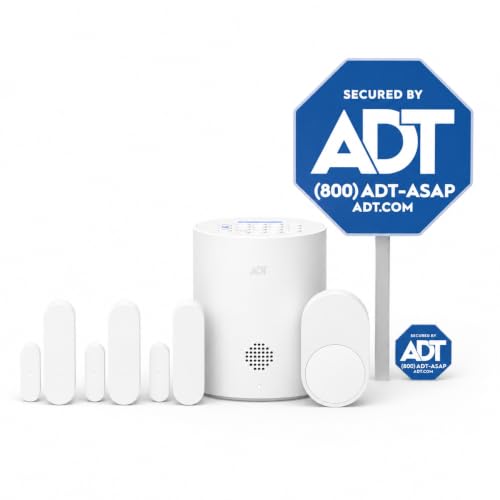
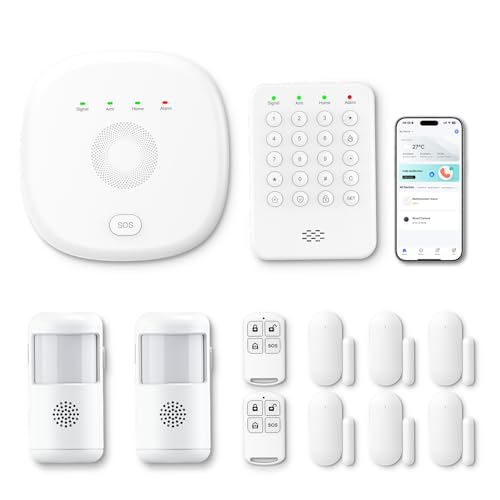

As an Amazon Associate we earn from qualifying purchases at no extra cost to you.
At a Glance: Self-Install Systems Compared
| System | Best for | Reported strengths | Reported limits |
|---|---|---|---|
| SimpliSafe | Renters, first-time buyers, apartments and small houses | Security.org and SafeWise both rank it at or near the top; month-to-month professional monitoring; an optional live-agent camera service called Active Guard | Some camera and backup features sit behind paid plans |
| Ring Alarm / Ring Alarm Pro | Owners of Ring cameras and doorbells, Alexa households | Wide range of add-on devices; the Pro hub is reported to include a built-in Wi-Fi 6 router; optional monitoring with cellular backup on paid tiers | Best value depends on buying into the Ring camera line; some features need a subscription |
| Abode | Smart-home enthusiasts with mixed brands | Works with Zigbee, Z-Wave, Alexa, Google Home, Apple Home, Nest and IFTTT according to roundups; a self-monitoring tier exists | Reviewers describe the selection of sensors as limited; cellular backup is tied to the higher plan |
| Wyze Home Monitoring | Tight budgets, small starter setups | Lowest entry cost in the roundups; simple app | One roundup notes no cellular backup, so an internet outage can block alerts |
| Cove | Buyers wanting a straightforward monitored kit | Appears in SafeWise’s DIY ranking | Smaller accessory catalog than the biggest brands |
| Arlo Security | Camera-first buyers who want a few sensors | Appears in SafeWise’s DIY ranking; strong camera line | Camera features lean on subscriptions |
What “Self-Install” Really Means
All of these brands describe their kits as tool-free or nearly tool-free. Door and window contact sensors use adhesive strips, motion detectors sit on a shelf or stick to a wall, and the base station plugs into a wall outlet. Plan on an hour or two for a three-bedroom home. The real work is deciding where each sensor goes, not attaching it. Walk the house and list every ground-floor entry point, then decide how many interior motion detectors you actually need. Pets, sunlight and heating vents can trigger false alarms, so makers publish placement guidance in their manuals and it is worth reading before you stick anything down.
If you rent, ask your landlord whether adhesive sensors are allowed. Most are removable, but they can lift paint on older walls. If you own, the same wireless kit can later be joined by a hardwired pro system, which is a reasonable upgrade path if your needs grow.
SimpliSafe: The Most Common Top Pick
Security.org rates SimpliSafe highly in its DIY category and SafeWise names it its best overall pick for 2026. Reviewers praise the simple setup, the lack of a long contract and the option to add professional monitoring by the month. SimpliSafe also offers Active Guard, in which trained agents watch camera feeds when a sensor trips and can dispatch responders. Reviewers add one caution: some camera features and backup options require a paid plan, so the starter kit alone does not give you the full experience.
Who it fits: apartments, condos and houses where you want a clear sensor set, a siren loud enough to wake the household and a company that handles monitoring for you. Who should look elsewhere: people who want a deep smart-home hub with lots of third-party devices.
Ring Alarm and Ring Alarm Pro: Best If You Already Own Ring
Ring’s alarm line builds on its camera and doorbell products. Roundups note a lower entry cost for the base kit, a large catalog of add-ons such as smoke and CO listeners, flood sensors and range extenders, and optional professional monitoring with cellular backup on a paid plan. The Pro hub is reported to include a Wi-Fi 6 router, which appeals to people who want one box to serve both roles, though it is not a replacement for a well-planned home network in a large house. One outlet ranked the eight-piece Ring kit first, which shows that opinions vary; most other lists place it second or third.
Who it fits: households already using Ring cameras, buyers who like Alexa routines, and anyone who wants the option to mix self-monitoring and paid monitoring. Who should look elsewhere: people who dislike subscriptions attached to video history.
Abode: Best for Smart-Home Mixing
Abode’s pitch is compatibility. Roundups list Zigbee, Z-Wave, Alexa, Google Home, Apple Home and HomeKit, Nest and IFTTT among its integrations, so a lock, light or thermostat from another brand can join the same rules. Reviewers also mention a free self-monitoring tier, with paid monitoring available if you want a call center in the loop. The drawbacks that appear in reviews are a narrower selection of its own sensors and the fact that cellular backup belongs to the higher plan.
Who it fits: tinkerers who want automations, such as arming the system when the last phone leaves. Who should look elsewhere: buyers who want a very simple box-and-keypad setup and a large first-party accessory range.
Wyze Home Monitoring: Lowest Entry Cost
Wyze is the budget option in the roundups, with a starter kit and optional monitoring both priced below the big names. The compromise noted by one reviewer is the absence of cellular backup, meaning that if your internet drops during a break-in attempt, remote notifications may not go out. That makes it better suited to apartments with reliable broadband or as a second layer in a house that already has other protection.
Budget Tiers
| Tier | What to expect | Typical picks |
|---|---|---|
| Budget | Small hub, a few contact sensors, one motion detector, self-monitoring, no cellular backup in some cases | Wyze, entry Ring Alarm kit |
| Mid-range | Larger sensor set, keypad, siren, optional monitoring, cellular backup on a paid plan | SimpliSafe, Ring Alarm Pro, Abode |
| Premium | Camera integration, agent-monitored video, many sensors, environmental detectors | SimpliSafe with Active Guard, Arlo bundles, larger Ring kits |
Features That Matter More Than Brand
Cellular and battery backup
A system that depends only on home Wi-Fi can go quiet during a router failure or power cut. Look for a hub with a backup battery and a cellular option, even if it is part of a paid plan, and confirm in the manual how long the battery is stated to last.
Monitoring terms
Month-to-month monitoring lets you try a plan and cancel. Contracts, where they exist, should be read closely. Also look at what is included: some plans cover only alarm dispatch, others add camera video history, extra storage and smart-home features.
Sensor coverage
Contact sensors on every ground-floor door and accessible window, glass-break sensors for large glass areas, and one or two motion detectors covering hallways are the usual starting layout. Pet-immune motion sensors exist from several makers, with weight limits stated in their specifications.
Smoke, CO and flood add-ons
Some systems can listen for an existing smoke or carbon monoxide alarm and notify you. These add-ons should be treated as notification helpers, not as replacements for certified detectors on every level. Follow the maker’s instructions and local fire code, and consult a licensed electrician or your fire department if you are unsure about alarm placement.
Pick X If… Decision Table
| Pick | If you… |
|---|---|
| SimpliSafe | want the most commonly recommended all-round kit with month-to-month monitoring |
| Ring Alarm Pro | already own Ring cameras or want a hub that also acts as a router |
| Abode | run Zigbee, Z-Wave, HomeKit or IFTTT gear and want one rules engine |
| Wyze | need the lowest entry cost and have dependable internet |
| Arlo | care most about camera quality and need only a few sensors |
| Cove | want a simple monitored kit without a huge accessory menu |
Alternatives Worth Considering
- Frontpoint: listed second in SafeWise’s DIY ranking according to the search summary; it usually pairs equipment with professional monitoring.
- Camera-only setups: if you only need to see who is at the door, a few cameras with local storage can cost less than a full alarm. See the separate camera-system guide on this site.
- Professional installation: larger homes, hardwired sensors and fire integration are better handled by a licensed alarm company.
Setup and Care Notes
- Test every sensor after installation and then monthly, using the app’s test mode.
- Replace batteries on the schedule in the manual, and do not wait for a low-battery warning if you travel often.
- Keep the hub centrally located, off the floor, away from large metal objects and not directly beside the router.
- Use strong, unique passwords and turn on two-factor sign-in in the app.
- Tell everyone in the household the arming code and the entry delay, so false alarms do not become routine.
- Check local rules, because some cities require a permit or charge for repeated false dispatches.
Common Mistakes
The first mistake is buying a kit that is too small. A starter pack may cover one door and one window, and the missing sensors are bought later at full cost. The second is ignoring the monthly plan: a cheap hub with expensive required features can cost more over several years than a mid-range kit. The third is placing motion detectors facing windows or heaters. The fourth is forgetting that some systems keep working only while the internet is up. Read the plan comparison before you decide, and match it to how you live.
Frequently Asked Questions
Do self-install systems need professional monitoring?
No. Most can sound a siren and send phone alerts without it. Professional monitoring adds a call center that contacts you and dispatches responders, usually for a monthly fee. Many buyers start without it and add it later.
Will a self-install system work if my internet goes down?
The local siren and sensors will still work, but remote alerts depend on connectivity. Systems with a battery backup and cellular option are designed to keep reporting, and one roundup notes Wyze lacks cellular backup. Check the maker’s specifications for the exact behavior.
Can I take the system with me when I move?
Generally yes. Adhesive sensors can be peeled off and reapplied, and the hub is re-paired in the app. Replace worn adhesive strips and confirm that your monitoring plan can be transferred to the new address.
Is a DIY system as secure as a professionally installed one?
Reviewers describe the best DIY kits as capable for typical homes, though professionally installed hardwired systems can offer more coverage in large properties. Security also depends on your habits: strong passwords, firmware updates and actually arming the system.
Do these systems work with smart speakers and locks?
Many do. Ring integrates with Alexa, and Abode is reported to work with Alexa, Google Home and Apple Home. Smart-lock support differs by brand, so confirm the exact lock model in the compatibility list before buying.
How many sensors do I need?
A common starting layout is a contact sensor on each exterior door and reachable window plus one or two motion detectors in main hallways. Larger homes and homes with many windows need more. Count entry points before choosing a kit size.







Write Your Review
No reviews yet. Be the first to share your experience!