
Key takeaways
- Yes, the BRK 5919 is a hardwired photoelectric smoke alarm with a 9V battery backup. Find out how the backup works, how to test it, and when to change the battery.
As an Amazon Associate we earn from qualifying purchases.
Yes. The 5919 is a BRK Electronics hardwired photoelectric smoke alarm, and it does have battery backup: a 9-volt battery takes over when the mains power fails, so the alarm keeps detecting smoke and sounding during a power cut. That matters more than it first appears, because a hardwired alarm with a dead or missing backup battery is silent exactly when a fire is most likely to start, during a storm or outage that knocks out the power. The backup is not a bonus feature. It is the part of the alarm that keeps it working when the wiring cannot.
This guide is for anyone who has found the number 5919 printed on the alarm on their ceiling and wants a straight answer, for homeowners checking whether their existing alarms will still work in an outage, and for anyone replacing a dead unit. It explains what the 5919 is, what its battery backup does, how to tell whether yours is working, and what to do when it is not.
How to Choose
What the 5919 Actually Is
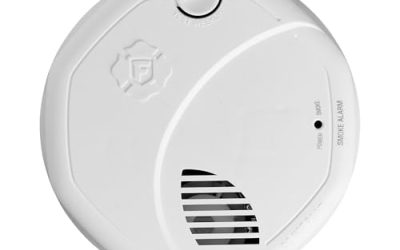
The 5919 is a smoke alarm made by BRK Electronics, part of the same family as First Alert hardwired alarms. It is a mains-powered photoelectric alarm, which means it runs on household AC power and detects smoke with a light beam and sensor, a design that responds well to the larger particles from slow, smouldering fires. It is built for single and multiple station use, so several units can be interconnected and sound together when one of them detects smoke. BRK’s own manuals for its hardwired alarms list the 5919 and its sibling model, the 5919TH, among the compatible smoke alarm models in this interconnect family, alongside the 9120, 7010, 4120, and 4919.
What Battery Backup Means on a Hardwired Alarm
Battery backup means the alarm has two power sources and switches between them automatically. Under normal conditions the 5919 runs on mains power, and the 9-volt battery sits in reserve, doing nothing until the power fails. When the mains supply is interrupted, the battery takes over at once, and the alarm keeps working without any action from you. Fires do not wait for the power to come back. The backup only protects you if the battery is actually fitted and fresh, though. BRK’s manuals for this alarm family note that the battery compartment resists closing unless a battery is installed, and that a unit with no AC power and a dead or missing battery cannot operate at all.
How to Tell Whether Your Backup Is Working
Start with the simplest checks, and do them with the power on. Press and hold the test button until the horn sounds, which confirms the alarm, battery, and sounder all work. Look for the indicator light: on BRK hardwired alarms in this family, a green light shows AC power is present, and a red light flashes to show the unit is operating. If the alarm chirps at regular intervals, that is the low-battery warning, and it means the backup battery needs replacing even though the alarm still runs on mains power. For a fuller check, replace the battery first, then press the test button again; a unit that still chirps or stays silent with a fresh battery is faulty.
Battery Replacement and the Ten-Year Limit
Treat the backup battery as a consumable with a schedule. Replace the 9-volt battery yearly, and immediately when the low-battery chirp starts, using the battery type printed on the unit. On BRK alarms in this family the battery is activated by pulling a tab when the unit is first installed, and the tab should not be removed until AC power is switched on, so the battery is not drained before use. Write the installation date on the back of the unit when you fit it, because the alarm itself has a service life too: replace a smoke alarm ten years after its manufacture date, even if the test button still sounds, because the sensor degrades with age.
Smoke Alarm Safety Basics
Place one alarm inside each bedroom, one outside each sleeping area, and one on every level of the home, including the basement, and mount them on the ceiling or high on a wall following the instructions that came with the unit. Where the ceiling meets the wall, keep the alarm away from the corner itself, since still air gathers there and smoke reaches the sensor more slowly. Test each alarm once a month by pressing the test button until the horn sounds, and replace a 9-volt battery at least once a year or as soon as the low-battery chirp begins. Keep alarms away from kitchens and bathrooms where steam and cooking smoke cause nuisance alarms, and never paint over an alarm or block its vents, since paint and dust can stop the sensor from detecting smoke. Vacuum the outside of the alarm gently from time to time to keep dust out of the sensing chamber, and never use a cleaning spray on it.
Interconnected alarms are safer than single units because every alarm in the house sounds when any one of them detects smoke, so a fire in a distant room still wakes the household. That is one of the main advantages of a hardwired system like the 5919’s, and it is worth preserving when you replace a unit: a standalone battery alarm in the same spot cannot warn the bedrooms. Agree on an escape plan with everyone in the home, keep exits and hallways clear, and practise the plan, including a meeting point outside and a second way out of each bedroom. If an alarm sounds and you smell smoke or see fire, leave the building at once and call the emergency services from outside rather than stopping to investigate, gather belongings, or open doors that feel hot. Do not re-enter until the fire service says it is safe, and call for help even if the fire seems small, since smoke can incapacitate a person faster than flames reach them.
Which One Fits Your Situation
You Already Have a 5919 on the Ceiling
Keep it. You already own a hardwired alarm with battery backup, which is a solid setup, and the right move is maintenance rather than replacement. Open the battery drawer, fit a fresh 9-volt battery, press the test button until the horn sounds, and note the date on the unit. If it tests cleanly and the manufacture date is under ten years old, there is nothing to buy and nothing to change.
Your 5919 Chirps or Goes Quiet in a Power Cut
Replace the battery first, before assuming the alarm itself has failed. A regular chirp is the low-battery warning, and a unit that falls silent during an outage almost always has a spent or missing backup battery. Fit a fresh 9-volt battery, make sure the battery drawer closes fully, and test the alarm. If the chirping continues with a new battery, the unit itself is faulty or past its service life.
You Are Replacing a Dead 5919
Match the replacement to the wiring you already have. The 5919 belongs to BRK’s hardwired interconnect family, so a replacement from the same family will connect to the existing wiring and interconnect with the other alarms in the house. Check the compatibility list in the replacement’s manual before buying, and confirm it is a hardwired model with battery backup rather than a battery-only alarm, or the interconnect will not work.
You Are Choosing Between Keeping It and Going Battery-Only
Keep the hardwired setup if you can. A hardwired alarm with a working battery backup gives you two power sources, and an interconnected system warns the whole house at once, which standalone battery alarms cannot do. A battery-only alarm is simpler to install and suits a rented room or a spot with no wiring, but it depends entirely on one battery and cannot trigger the alarms in other rooms.
Common Mistakes
- Assuming a hardwired alarm needs no battery at all, and leaving the backup battery out or letting it go flat for years, so the alarm dies in the first power cut.
- Removing the battery to silence a nuisance alarm instead of moving the alarm or fanning the smoke away, which leaves the house unprotected during the next outage.
- Ignoring the low-battery chirp for weeks instead of replacing the battery the day it starts, and then forgetting which unit was chirping.
- Leaving the battery activation tab in place after installation, so the backup was never actually connected in the first place.
- Keeping an alarm past ten years because it still beeps on test, even though the sensor itself has degraded and may respond too slowly.
- Painting over an alarm, or mounting it beside a kitchen or bathroom, where steam and cooking smoke cause false alarms that tempt people to disable it.
Frequently Asked Questions
Does the 5919 smoke alarm have battery backup?
Yes. The 5919 is a BRK Electronics hardwired photoelectric smoke alarm with a 9-volt battery backup, so it keeps working when the mains power fails. The battery takes over automatically during an outage, and the alarm sounds just as it would on mains power. Keep the battery fresh and fitted, because a dead or missing battery removes that protection entirely.
What battery does the 5919 use?
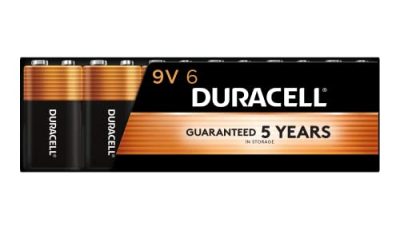
The 5919 uses a 9-volt battery as its backup power source. Replace it at least once a year and immediately when the low-battery chirp starts, and check the battery type printed on the unit or in its manual before buying a replacement. The battery drawer on BRK alarms in this family resists closing unless a battery is fitted, which helps prevent the unit being left without its backup.
How long does the backup battery last?
No verified runtime figure was found in the sources consulted, so no number is stated here. In practice, a fresh 9-volt battery should carry the alarm through ordinary power cuts, and the alarm warns with a regular chirp well before the battery runs out. Replace the battery once a year and on the first chirp, and if your unit dies quickly in an outage, treat the battery as spent.
Is the 5919 the same as the 5919TH?
No. The 5919TH is a sibling model in the same BRK hardwired family, and BRK’s manuals list both models as interconnect-compatible with each other. The two models share the same wiring and interconnect system, but they are not the same unit, so check the manual for the model printed on your alarm before assuming its features match. Before swapping one for the other, confirm compatibility in the replacement’s manual.
More from Amazon
Programs that pair well with the guide above. Offers and eligibility are set by Amazon and may change.
Free shipping on eligible items, Prime Video and more. Eligible new members can start with a free trial.
Start a Prime free trialAudiobooks and podcasts to listen to on the go. Eligible new members can start with a free trial.
Try Audible freeAd-free music streaming. Eligible new subscribers can start with a free trial.
Try Music Unlimited freeA free business account with business pricing and bulk-buying tools for work, shop or home office.
Create a business accountAs an Amazon Associate we earn from qualifying purchases.


Write Your Review
No reviews yet. Be the first to share your experience!