

For a multi-camera home, a wired PoE kit with a network video recorder, such as the Reolink RLK8-810B4-A or a Lorex 4K NVR system, is the most dependable way to get local storage with no required subscription, while a single microSD camera from Reolink or TP-Link suits a renter or a one-door setup. Buyers who want a polished app and a fully local ecosystem can look at Ubiquiti UniFi Protect, and tinkerers who want open standards can build around Amcrest cameras. Which one fits depends on how many cameras you need, whether you can run cable and how long you want to keep footage.
Local storage means the recordings stay on a drive or card that you own instead of in a cloud plan. That avoids monthly fees and keeps video inside your home network, but it also puts you in charge of drive capacity, backups and physical theft. This guide compares the kit types that makers and reviewers point to, explains how to size storage, and gives a decision table. Specifications are attributed to the maker, and outlet statements are named. Most roundups are affiliate-style, so read the maker’s page for the exact kit.
Our top picks

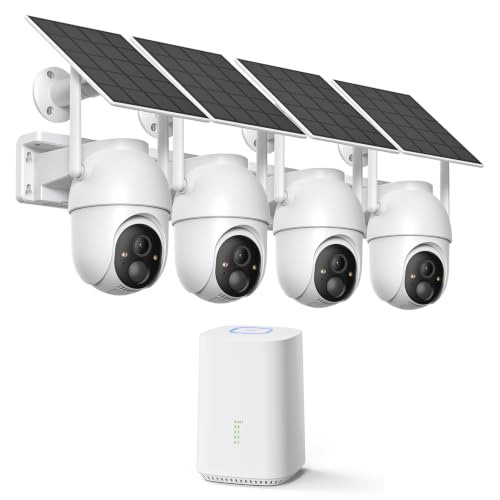


As an Amazon Associate we earn from qualifying purchases at no extra cost to you.
At a Glance: Local Storage Systems Compared
| System | Best for | Key stated specs | Limits |
|---|---|---|---|
| Reolink RLK8-810B4-A | Four-camera home with continuous recording | The maker lists 4 PoE 4K cameras, 8-channel NVR with 2TB drive included, expandable to 12TB, person, vehicle and motion detection, infrared night vision of 30 meters, IP67, about 8 days of storage with 4 cameras on default settings | Needs Ethernet runs; storage days depend on settings |
| Lorex 4K 8-channel 2TB kits | Larger properties and months of storage | The maker lists 8-channel NVRs with 2TB drives, kits with 4 or 8 cameras, expansion to 6TB or 8TB depending on kit, some Fusion NVRs accept wired and Wi-Fi cameras | Models and drive limits vary by kit; one comparison site measured night vision shorter than the stated 150 feet |
| Amcrest 4K PoE NVR and cameras | DIY builds and third-party software | The NV4108E-2TB is listed as an 8-port PoE NVR for up to 8 cameras at up to 8MP with a 2TB drive; Amcrest cameras are noted by reviewers for ONVIF support | More setup; mixing products takes know-how |
| Ubiquiti UniFi Protect with UNVR | Premium fully local ecosystem | Reviewers describe local recording and a polished app | Proprietary protocol rather than open RTSP; higher tier |
| Reolink RLC-820A or RLC-811A single camera | One or two cameras without an NVR | The maker lists microSD to 512GB on the 811A, Reolink NVR support and FTP | Card capacity limits history; card can be taken with the camera |
| TP-Link Tapo C460 or other Tapo models | Wireless renters and budget buyers | The maker lists microSD to 512GB, 4K, and optional cloud plan | Battery and Wi-Fi dependent |
| eufy with HomeBase | Easiest hub-based local setup | Roundups describe local storage on a base station | No open streaming standard |
Choosing the Right Architecture
NVR kit: the most complete option
A network video recorder sits in a closet, connects to a router and records from every camera. PoE cameras take power and data from one cable, so there are no batteries and no Wi-Fi drop-outs. The Reolink RLK8-810B4-A includes four 4K cameras and a 2TB drive, and the maker says the NVR supports up to 12 Reolink cameras with a mix of PoE and Wi-Fi models, up to eight in total on this unit. The advantage is continuous or event recording, central storage and a clear upgrade path. The cost is the cable run and the one-time work of drilling and routing.
microSD camera: the simplest route
A camera with a microSD slot needs no recorder. The Reolink RLC-811A and TP-Link Tapo C460 both list support for cards up to 512GB per their makers. This is the cheapest path and works well for a front door or garage. The drawbacks are limited capacity, the card can be removed or stolen with the camera, and managing many cameras means many cards.
Hub or base station systems
Eufy uses a base station that stores footage locally and links to wireless cameras. Reviewers describe this as the easiest local setup, though without open streaming protocols. It suits people who want battery cameras and a local archive without wiring.
Ecosystem or open standards
Ubiquiti UniFi Protect records locally to its own recorder and gives a refined app, but, as reviewers note, it uses a proprietary protocol. Amcrest and Reolink cameras support RTSP or ONVIF per reviewer reports, so they can feed third-party recorders or software such as Frigate. If you may swap parts later, open standards give flexibility.
How Much Storage Do You Need?
Storage depends on the number of cameras, resolution, bitrate, and whether you record continuously or only on motion. Reolink says the 2TB drive in the RLK8-810B4-A holds about 8 days with four cameras on default settings. That is a useful benchmark: if you want 30 days, plan for about four times as much storage or switch to event-only recording. The Lorex kits list drives of 2TB expandable to 6TB, 8TB or more depending on the model, and one 4K+ Fusion kit is listed as expandable to 16TB. Use surveillance-rated hard drives designed for continuous writing. Drives fail, so replace them on the maker’s schedule and consider exporting important clips to a second location.
Other Factors That Matter
Subscription-free does not mean feature-free
Reolink, Lorex and Amcrest kits record locally to the included drive without a subscription, according to a comparison site. Many still offer optional cloud plans for off-site backup. Smart detection of people and vehicles on Reolink cameras is done in the camera, so alerts continue without a plan, per the maker.
Remote viewing
Local storage does not stop remote viewing. Most systems connect to a phone app through a secure relay or peer-to-peer connection. Use strong, unique passwords, install firmware updates and avoid opening ports on your router unless you understand the risk.
Night vision
Makers list infrared ranges such as 30 meters on the Reolink kit and 150 feet on Lorex Smart Deterrence cameras. One comparison site reports measuring about 130 feet against the Lorex claim, a reminder that stated range is a ceiling. For a typical yard, plan on shorter effective distances.
Theft and fire protection
A recorder in a visible hallway is as stealable as a camera. Put it in a locked cabinet or an interior closet. If you want protection against theft or fire, add periodic off-site or cloud backups of important clips.
Power and cable safety
PoE uses low-voltage power. Use outdoor-rated Ethernet, seal connectors and keep cables away from mains wiring. Any mains-voltage work, such as new outlets near the recorder, should be done by a licensed electrician.
Tier-by-Tier Notes
Budget tier
Wireless microSD cameras from Tapo and Wyze are the cheapest route. Hiseeu appears in a roundup with a 16-channel NVR kit and a 1TB drive. Budget kits can lack polish in software and support, so read return terms.
Mid-range tier
Reolink and Amcrest PoE kits sit here. They offer 4K cameras, a 2TB recorder and smart detection. Reviewers call Reolink PoE NVR kits the leading consumer choice for full local storage, and Amcrest is favoured by those who want deeper third-party support.
Premium tier
Lorex kits with Smart Deterrence cameras, and Ubiquiti UniFi Protect, are higher-tier options with stronger features, larger drive capacity and polished apps, at the cost of more money and, for Ubiquiti, a closed ecosystem.
Pick X If… Decision Table
| If this describes you | Choose | Why |
|---|---|---|
| You own your home and can run cable | Reolink RLK8-810B4-A or a Lorex 4K PoE kit | Continuous recording on a recorder, no batteries |
| You rent and want no cable | Tapo or Reolink wireless camera with microSD | Easy install, local card |
| You want a polished, fully local system | Ubiquiti UniFi Protect | Premium app and local recording |
| You like to tinker or use Frigate | Amcrest PoE cameras | ONVIF support noted by reviewers |
| You want months of footage | Lorex or Reolink with larger drives | Drives expandable to 8TB or more |
| You want a hub with battery cameras | eufy with HomeBase | Easy local storage |
Alternatives to Consider
- NAS-based recording: A network storage box can record from ONVIF cameras and double as a file server.
- Hybrid backup: Local recording plus a small cloud plan for event clips protects against theft.
- Dash-style or indoor cameras: For one room, a basic indoor camera with a card may be enough.
A Note on Sources
Reolink, Lorex, Amcrest and TP-Link pages supply the specifications. Review outlets, including Security.org and several comparison sites, describe market positions. Some roundups are months old and use affiliate links, so read each maker’s kit contents, such as camera count, drive size and warranty, before buying.
Frequently Asked Questions
Do local storage cameras need a monthly fee?
Not for basic recording. Reolink, Lorex and Amcrest systems record to an included drive without a subscription, according to a comparison site. Optional cloud plans are available for off-site backup.
How long will a 2TB drive record?
It depends on the camera count and settings. Reolink states that its 2TB NVR holds about 8 days with four cameras on default settings. Event-only recording stretches this a lot.
Is local storage safer than the cloud?
It keeps video in your home and avoids cloud accounts, but a thief can take the recorder. Place it in a locked cabinet and consider an off-site backup for key clips.
Can I add more cameras later?
Usually, up to the NVR channel limit. The Reolink unit supports up to 12 Reolink cameras per the maker, with up to eight PoE. Lorex Fusion models accept wired and Wi-Fi cameras.
PoE or Wi-Fi cameras: which is more reliable?
PoE cameras are generally more reliable because they use a wired connection and do not depend on batteries. Wi-Fi cameras are easier to install.
Can I watch live video from my phone with local storage?
Yes. Most systems offer app access. Use strong passwords, update firmware and avoid exposing the recorder directly to the internet.








Write Your Review
No reviews yet. Be the first to share your experience!